

- Tracer/collect: an open-source eBPF agent that gathers execution signals from the host-layer
- Tracer/datalake: a shared execution view across pipelines and environments
- Tracer/tune and Tracer/sweep: use that signal to solve different problems
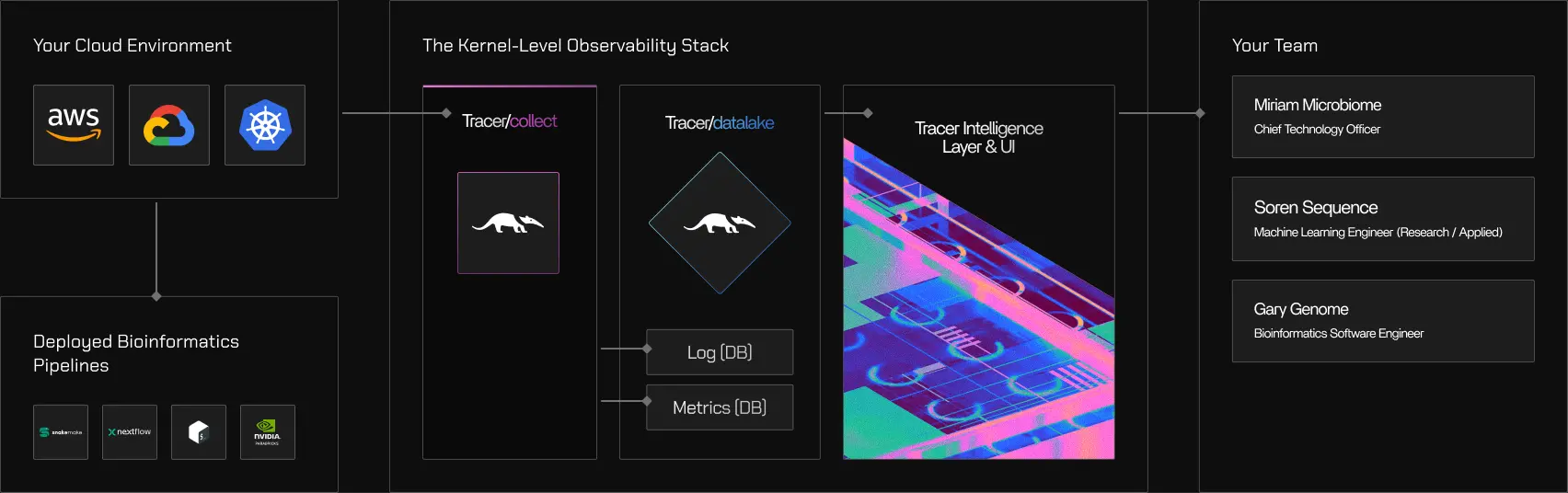
What Tracer is made of
Tracer consists of three components with distinct responsibilities:- Tracer/collect gathers execution signals directly from the operating system
- Tracer/tune uses those signals to analyze and optimize pipeline performance
- Tracer/sweep uses the same signals to uncover systemwide cloud waste
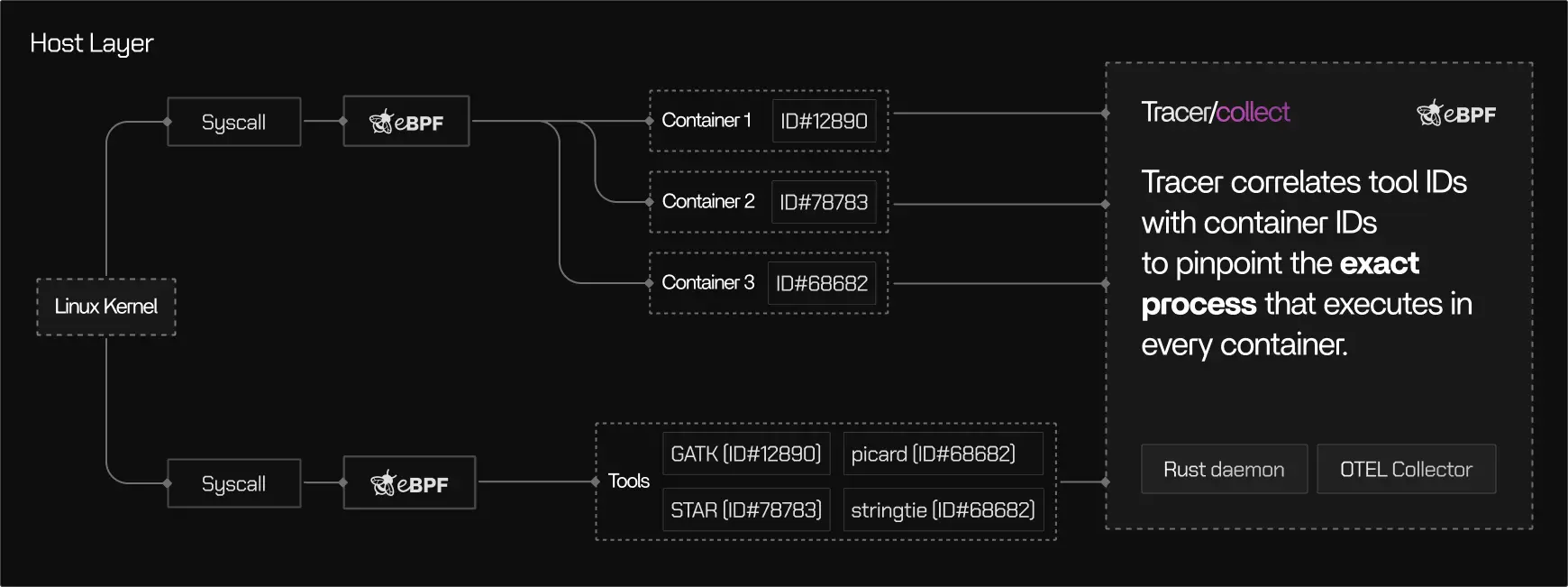
Architecture at a glance
Tracer’s data flow can be understood in four stages:Attach
Tracer/collect attaches non-intrusively to running processes and containers on a Linux host using eBPF, a Linux kernel technology for safe, low-overhead instrumentation. No code changes, container restarts, or application modifications are required.
Collect
Execution events are captured at the kernel boundary, including CPU scheduling, memory activity, disk and network I/O, and process lifecycle events. Only relevant signals are selected through intelligent filtering rules.
Correlate
Low-level events are mapped to higher-level execution context such as containers, tools, tasks, runs, and pipelines. This mapping uses kernel-native identifiers like PIDs, namespaces, and cgroups.
The execution signal (single source of truth)
Tracer’s execution signal is a structured representation of what actually ran on the system. It includes:- CPU usage and scheduling behavior
- Memory allocation and pressure
- Disk and network I/O activity
- Process lifecycles and relationships
- Container and host context
It explicitly does not include:
- Application payloads or scientific input/output data
- Source code, function calls, or language-level execution traces
- Application- or domain-specific interpretation of what a command does
How correlation works
Raw kernel events are not useful on their own. Tracer/collect correlates them into meaningful execution context. At a high level:- Kernel events are associated with processes
- Processes are grouped by containers and cgroups
- Containers and processes are mapped to tools, tasks, runs, and pipelines
- Which tool generated this I/O?
- Which task was idle during this period?
- Which pipeline run consumed these resources?
Where Tracer/tune fits
Tracer/tune focuses on pipelines that already work, but are slow or inefficient. Using the execution signal, Tracer/tune:- Visualizes actual resource usage at the task and process level
- Identifies underutilization, contention, and bottlenecks
- Distinguishes compute-bound, memory-bound, and I/O-bound stages
- Produces evidence-based recommendations for right-sizing and optimization
Tracer/tune
Learn more about pipeline performance optimization
Learn more about pipeline performance optimization
Where Tracer/sweep fits
Tracer/sweep focuses on systemwide cloud efficiency. Using the same execution signal, Tracer/sweep:- Scans cloud compute based on real execution activity
- Identifies idle time, unused capacity, and hidden inefficiencies
- Surfaces waste that does not appear in billing reports or dashboards
- Avoids predictive shutdown heuristics by relying on observed behavior
Tracer/sweep
Learn more about cloud waste detection
Learn more about cloud waste detection